The All-New CommandIQ® Wi-Fi App:

Your Wi-Fi,

Your Way,

One Tap Away

Manage your WiFi experience with ease, keep everyone connected, and enjoy peace of mind—whether you’re gaming, working, parenting, or just relaxing. Sign Up Today!


Think of it as your personal Wi-Fi assistant

The all-new CommandIQ® WiFi app is here to make it all easier.

Complete control, all from your phone.

Between connecting devices, streaming in any room, your work Zoom calls, the kids streaming TikTok and those late-night gaming sessions, your WiFi’s working overtime.

The all-new CommandIQ® WiFi app is here to make it all easier. It’s your WiFi remote control, keeping your devices running smoothly so everyone stays happy.

Set up is easy, network security is built-in, and you’re in complete control, all from your phone.

Why CommandIQ Feels Like Home

We get it—your home’s WiFi can feel like a juggling act. The kids need bandwidth for homework (and, okay, maybe some Roblox). You need a steady connection for work calls. And everyone wants simplicity and to feel safe online.

The all-new CommandIQ® app is designed with users like you in mind. It’s easy to use, packed with tools to keep your WiFi humming, and built to make your day a little less stressful.

Whether you’re managing a houseful of devices or just want a connection you can trust, CommandIQ’s got you covered.

Family-Friendly Control: Manage your WiFi without needing a tech degree—it’s as simple as checking your email. 

Made for Everyone: From kids to gamers to work-from-home parents, there’s something for every family member. 

Stress-Free Setup:  Get started in minutes and enjoy WiFi that works the way you need it to.
Complete Wi-Fi Control

At Your Fingertips

The new CommandIQ app is a remote control for your WiFi, filled with features to make your connection stronger, safer, and more empowering for how you live. Here’s how:

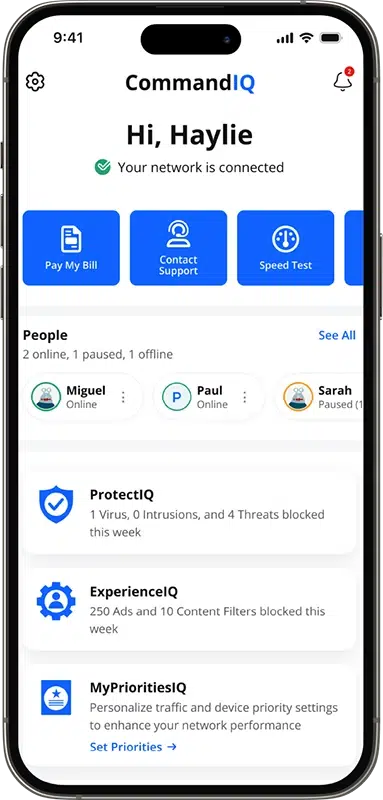
NEW Scrollable Carousel: Your Experience Hub

What It Does: Swipe through easy-to-use tools like speed tests and parental controls, right on the main screen.

Why It’s Great: Find what you need fast—no hunting required.

Perfect For: Anyone who wants complete control and management of your Wi-Fi.

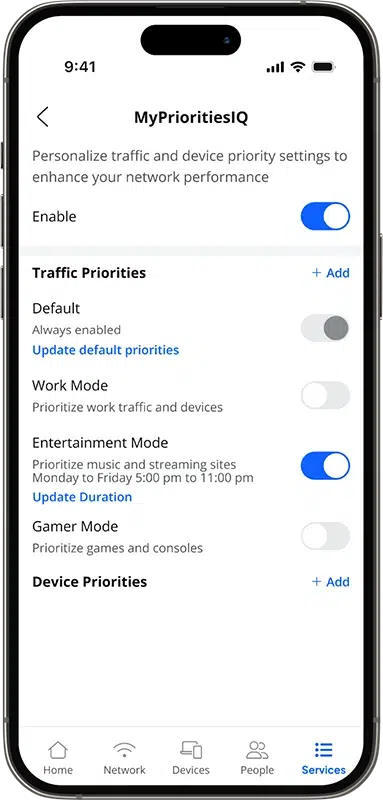
MyPriorities Modes: WiFi That Fits Your Day

What It Does: Choose “Gaming Mode” for smooth game play, “Work Mode” for reliable productive work connectivity, or “Entertainment Mode” for optimized streaming.

Why It’s Great: Your WiFi adjusts to maximize performance based on your “Mode”. So everyone gets the best connection.

Perfect For: Gamers, professionals, and binge-watching enthusiasts.

Easy Self-Install & Onboarding: Start Fast

What It Does: Set up your WiFi in just a few steps, with clear instructions right in the app.

Why It’s Great: You’re ready to go in no time, no tech support needed.

Perfect For: New users and anyone who want to skip the hassle of traditional install.

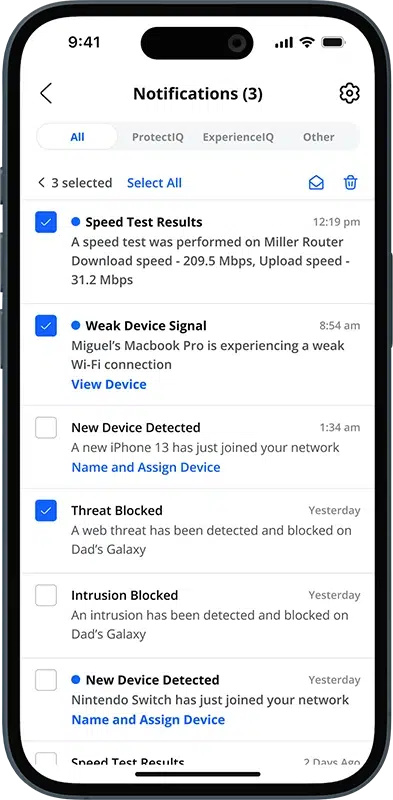
Real-Time Alerts & Performance Stats: Stay In The Know

What It Does: Get notifications if your WiFi slows down, plus stats to keep it running smoothly.

Why It’s Great: Fix issues before they frustrate your movie night or work call.

Perfect For: Anyone who wants a dependable connection and proactive updates.

Custom People Profiles & Device Recognition: Make It Personal

What It Does: Swipe through easy-to-use tools like speed tests and parental controls, right on the main screen.

Why It’s Great: Find what you need fast—no hunting required.

Perfect For: Anyone who wants complete control and management of their Wi-Fi.

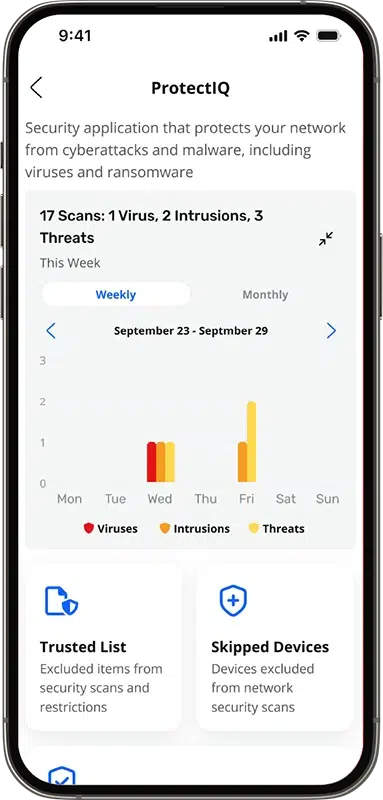
Built-in Security: Safe from the bad parts of the internet

What It Does: Automatically scans and blocks traffic from viruses, malware, and malicious attacks on your devices.

Why It’s Great: Connect with confidence knowing your connection and most vulnerable devices are protected.

Perfect For: Anyone who values their data, privacy and wants peace of mind.

Powered by CommandIQ®
Create online rules for your home network

CommandIQ brings your family together with WiFi that’s fast, safe, and tailored to what you love.
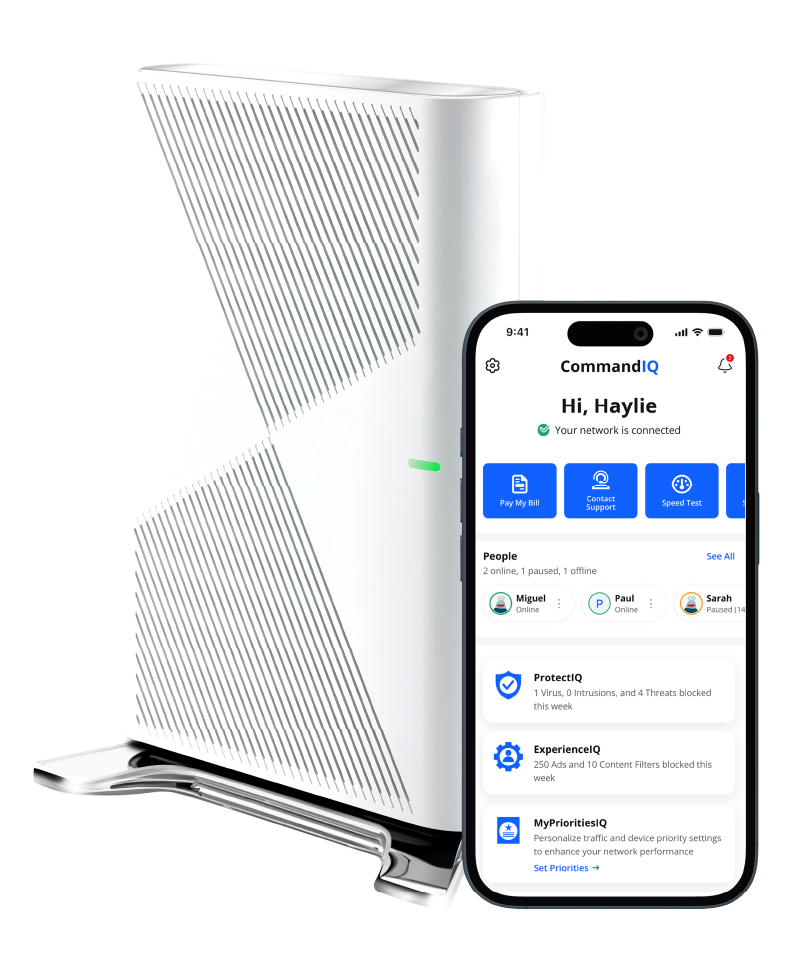
Built for your home

Your home’s WiFi needs are as unique as you are, and CommandIQ is here to make everyone feel at home.

Whether it’s keeping the kids safe, powering your work, or just making sure the WiFi doesn’t quit during game night, this app’s got something for every member of your crew.


WiFi 6 Certified—Because You 
Deserves the Best

For Gamers:

“Gaming Mode” and real-time alerts mean no more lag, so you can focus on the win. 

For Work-from-Home Parents:

“Work Mode” keeps your video calls clear and your files flying, even with kids streaming in the background. 

For Families with Kids:

Avatars, internet pauses, schedules, and content filters make parenting easier—and a little more fun.

For Everyone Else:

Simple navigation makes setup a breeze. Get out of the box performance and reliability. 

Easily share your WiFi, and top-notch security standard mean your WiFi just works, no fuss required.

Join over 100,000 subscribers using CommandIQ

Arkwest’s subscribers are loving the new CommandIQ app. Don’t take our word for it!

“The new CommandIQ app has been a game-changer for our family! I love the custom profiles and parental controls. Our work calls are finally lag-free-no more Unstable Connection”.

– John, Proud Parent & Subscriber

Choose the plan that fits your lifestyle

Fast, reliable connections for every household. Check availability to see which plans are offered in your area.

Tech Enthusiast

Ideal for pro-gamers and early tech adopters.

Connected Home

Ideal for families, streamers, and gamers.

Remote Pro

Ideal for remote work and online learning.

Everyday Connect

Ideal for staying connected for everyday essentials.

Frequently Asked Questions

Do Not Display

What is CommandIQ 3.0?

CommandIQ® 3.0 is a powerful and easy-to-use mobile app that puts you in control of your home Wi-Fi. From your smartphone or tablet, you can:

  • Manage your network – Change your Wi-Fi name and password anytime.
  • Monitor connected devices – See what’s online and manage access.
  • Set up parental controls – Keep your family safe with content filters and usage limits.
  • Run speed tests – Check your internet performance instantly.

CommandIQ 3.0 works seamlessly with GigaSpire systems and even supports many third-party routers and gateways. Whether you’re a tech-savvy user or just want a simple way to manage your Wi-Fi, CommandIQ 3.0 is built to meet your needs.

What’s New in CommandIQ 3.0?

CommandIQ® 3.0 brings exciting new features to help you personalize and control your home Wi-Fi experience like never before:

  • Quick Link Carousel
    Easily access your most-used features right from the home screen.
  • People and Avatars
    Create profiles for family members with avatars to manage devices and set controls.
  • Promotions and Announcements
    Stay informed with updates and special offers from your service provider.
  • SmartHome Solution Tiles
    One-tap access to SmartHome features like cybersecurity, parental controls, and camera integrations.
  • MyPrioritiesIQ
    Customize your network to prioritize what matters most—whether it’s streaming, gaming, or work.
  • Network and Device Prioritization
    Choose which devices get the fastest speeds when it counts.

What is the Quick Link Carousel?

The Quick Link Carousel is a set of easy-access buttons located at the top of your CommandIQ® dashboard. You can swipe through these tiles to quickly reach your favorite features—like running a speed test, managing devices, or checking network status—with just a tap.

It’s designed to save you time and make navigating your Wi-Fi settings simple and intuitive.

What are People and Avatars?

People and Avatars is a helpful new feature in CommandIQ® 3.0 that lets you create user profiles for everyone in your household. Instead of uploading personal photos, you can choose from a variety of avatars to represent each person.

This feature is part of the People Carousel, making it easy to manage devices, apply parental controls, and personalize your Wi-Fi experience for each family member—all in a simple, visual way.

What are Promotion and Announcement Tiles?

Promotions and Announcement Tiles are visual banners that appear right on your CommandIQ® home screen. These tiles help keep you informed and connected with Arkwest. You might see:

  • Special offers and services like SmartTown, Arlo cameras, Bark parental monitoring, or ScamWatchIQ.
  • Community updates including local events, service alerts, or new product launches.
  • Plan upgrades and seasonal campaigns tailored to your needs.

What are SmartHome Solutions Tiles?

SmartHome Solution Tiles are interactive buttons on your CommandIQ® home screen that give you quick access to powerful SmartHome services. With just a tap, you can:

  • Protect your network with ProtectIQ® cybersecurity tools
  • Manage content and screen time using ExperienceIQ® parental controls
  • Prioritize your devices with MyPrioritiesIQ for smoother streaming, gaming, and work
  • Connect to third-party services like Arlo® cameras, Bark, ScamAssist, and ScamWatchIQ

These tiles make it easy to personalize and secure your home Wi-Fi experience—all in one place.

What is MyPrioritiesIQ?

MyPrioritiesIQ is a feature within the CommandIQ® app that gives you more control over your home Wi-Fi experience. It allows you to prioritize bandwidth for specific activities—such as GamingWork, or Entertainment—based on what matters most to you at any given time.

Using a simple interface, you can select a mode that fits your current needs:

  • Gaming Mode: Optimizes your connection for smooth, lag-free gameplay.
  • Work Mode: Ensures reliable video calls and fast uploads for remote work.
  • Entertainment Mode: Delivers uninterrupted streaming for movies and shows.

This feature helps ensure that your Wi-Fi performs at its best, no matter what you’re doing.

What are MyPrioritiesIQ Modes?

What are MyPrioritiesIQ Modes?

MyPrioritiesIQ Modes are a key feature of the third-generation CommandIQ® app. They allow you to optimize your home Wi-Fi by prioritizing bandwidth based on your current activity.

Work Mode

  • Prioritizes bandwidth for tasks like video calls, file uploads, and cloud collaboration tools.
  • Minimizes lag and interruptions during Zoom or Teams meetings.
  • Speeds up syncing and sharing of work documents.
  • Helps create a smoother, more reliable connection for remote work.

Entertainment Mode

  • Prioritizes bandwidth for streaming services, music, and media apps.
  • Improves video quality and reduces buffering on platforms like Netflix, YouTube, and Spotify.
  • Helps ensure smooth playback—even during peak hours.
  • Ideal for movie nights, music sessions, and binge-worthy shows.

Gamer Mode

  • Prioritizes gaming traffic for faster, more responsive gameplay.
  • Minimizes lag and latency during online matches.
  • Reduces interference from background devices and apps.
  • Helps deliver smoother, uninterrupted gaming sessions.

What is Network and Device Prioritization?

CommandIQ® 3.0 gives you smarter control over your home Wi-Fi by intelligently managing how bandwidth is shared across devices and activities. Whether you’re working, gaming, or streaming, the app helps ensure your most important tasks get the strongest connection.

User Profiles for Device Management
With CommandIQ® 3.0, you can assign devices to individual household members using custom user profiles. This gives you more control over how each person connects to your home network.

Here’s what you can do:

  • Set internet time limits to manage screen time for kids or teens.
  • Filter content to block inappropriate websites and keep browsing safe.
  • Track activity to see how and when devices are being used.

By organizing devices by user, you can indirectly prioritize bandwidth—making sure work calls, homework, and streaming all get the connection they need, when they need it.

Where can I download CommandIQ 3.0?

CommandIQ 3.0 is available for download on both the Apple App Store and Google Play Store. Simply search for “CommandIQ.”

Is there a cost to use CommandIQ 3.0?

The app is free to download and use with GigaSpire, GigaCenter and TR-069 third-party supported routers or gateways. Some advanced features or integrations may require a subscription or partnership with Arkwest.

How do I set up CommandIQ 3.0?

  • Download and install the CommandIQ 3.0 app from your device’s app store.
  • Open the app and sign in or create a new account.
  • Follow the on-screen instructions to connect the app to your supported Wi-Fi router or gateway.
  • Once connected, you can begin customizing your network, adding user profiles, and setting up controls.

Which GigaSpire systems are compatible with CommandIQ 3.0?

CommandIQ® 3.0 is compatible with many popular routers and gateways. To check if your device works with CommandIQ, refer to your router’s documentation.

How do I reset my password

If you forget your CommandIQ password, tap the “Forgot Password?” link on the login page. Follow the instructions to receive a reset link via email or SMS.

What are user profiles and how do they work?

User profiles let you assign devices to individual household members. This allows tailored controls such as internet time limits, content filtering, and activity tracking for each person.

How can I set up parental controls?

Set Up Parental Controls in the App

  1. Open the app and go to the “Profiles” or “Parental Controls” section.
  2. Create a profile for your child or select an existing one.
  3. Customize settings like internet access schedules, content filters, and device restrictions to fit your family’s needs.
  4. Your changes take effect right away and can be updated anytime.

What device management options are available?

Easily manage your home network—see which devices are connected in real time, assign them to family profiles, pause or resume their internet access, and prioritize bandwidth to keep your most important devices running smoothly.

How do I run a speed test?

From the main dashboard Quick Links, tap “Speed Test” to measure your internet connection’s upload and download speeds. Results are displayed in real time and stored for future reference.

The CommandIQ app makes it easy to run speed tests for individual devices, giving you clear insights into Wi-Fi strength, download and upload speeds, and latency. Each device is rated as Strong, Good, or Weak, helping you quickly spot and resolve connectivity issues.

What security features are included?

Enjoy peace of mind knowing your home network is protected with built-in WPA3 encryption, advanced firewall controls, and device-level access management. CommandIQ also gives you automatic security updates, tools to monitor threats, and real-time alerts if anything suspicious is detected—so you stay informed and in control.

Can I create a guest network?

Create a guest network in just a few taps—customize the name and password, set how long guests can stay connected, and keep their activity separate from your main network for added security and peace of mind.

Does CommandIQ 3.0 support mesh Wi-Fi systems?

CommandIQ 3.0 is fully compatible with mesh Wi-Fi setups, allowing you to manage multiple access points and ensure seamless coverage throughout your home.

Can I integrate CommandIQ 3.0 with smart home devices?

Connect your favorite smart home assistants—like Amazon Alexa and Google Assistant—directly through the app. You can also manage select smart devices with ease, giving you more control and convenience right from your phone.

Who can access my CommandIQ 3.0 data?

Only authorized users with login credentials can access your CommandIQ app and network settings. The app uses encryption and privacy best practices to protect your personal information.

How is my personal information used?

Your data is used solely to provide and improve CommandIQ services. Refer to the Arkwest app’s privacy policy for details on data collection, storage, and sharing practices.

How do I delete my CommandIQ account?

Within the app, go to Account Settings, then select “Delete Account.” Follow the prompts to permanently remove your data and close your account.

The app won’t connect to my router. What should I do?

  • Check your router – Make sure it’s powered on and broadcasting a Wi-Fi signal.
  • Verify your connection – Ensure your mobile device is connected to the correct Wi-Fi network.
  • Restart your router – A quick reboot can often resolve connection issues.
  • Update your software – Make sure both the app and your device’s operating system are up to date.
  • Need more help? – Visit the CommandIQ Help Center or contact <YourBrand>’s support team for personalized assistance.

Why are my devices not showing up in the app?

Some devices may not show up if they’re not currently connected, are using a different Wi-Fi network name (SSID), or have been blocked by parental controls. Refresh the device list or restart the app to update your view.

How do I report a bug or offer feedback?

Use the “Contact Support” or “Feedback” option in the app to report bugs, request new features, or share your thoughts directly with our development team.

How often is CommandIQ 3.0 updated?

Updates are released regularly to enhance features, improve security, and address bugs. Enable automatic updates on your device to ensure you always have the latest version.

What should I do if I suspect a security issue?

Immediately change your account password, check your device list for unauthorized access, and contact Arkwest  support through the app.

Can I set up VLANs or advanced networking features?

Advanced networking features such as VLAN setup may be available depending on your system / third party router model. Refer to your specific device’s documentation for instructions.

Does CommandIQ 3.0 support IPv6?

Yes, the app is built to support both IPv4 and IPv6 addressing schemes, future-proofing your home network.

Can I export my network settings?

Currently, exporting network settings is not directly supported in the app. However, some routers may allow you to back up or export configurations through their web interfaces.

Where can I find more help?

  • In-App Help Center & Tutorials – Get step-by-step guidance right inside the CommandIQ app.
  • CommandIQ 3.0 Website – Explore features, updates, and FAQs.
  • Support from Arkwest – Reach out for personalized troubleshooting and assistance.
  • Online Community Forums – Connect with other users, share tips, and find answers from real experiences.